


Revolut: Spend, Save, Trade
4.512.26K Reviews
App Specs
- Version
- 10.144.1
- Updated On
- License
- Free
- Downloads
- 50,000,000+
- Developer
- Revolut Ltd
- Categories
- Finance
- Platform
- Android, iOS
Screenshots


 Analysis by AppCompare
What makes Revolut worth considering is the way it brings everyday spending into a broader money-management routine. Instead of treating a card, a budget, savings and investments as completely separate jobs, it puts them under one roof. I find that most useful when I want to check where my money is going and make a small adjustment before the month gets away from me. It is still a financial app, not a substitute for paying attention to your choices, but the joined-up approach can make those choices easier to see.
I’ve been looking most closely at the spending side, because that is where a finance app has to prove its value in ordinary life. A budget only helps if it is simple enough to revisit, and a transaction alert matters only if it gives me a chance to notice something while it is still useful. Revolut’s appeal is less about one dramatic feature than about keeping spending visible alongside the other financial tools I might want to use.
Why seeing spending in context helps
Many banking apps show transactions, while dedicated budgeting apps ask you to build a separate picture of your finances. Revolut aims to narrow that gap: spending tools sit near saving and trading features, so I can think about a purchase in relation to a goal rather than as an isolated line on a statement. That arrangement will not suit everyone, but it can cut down on the mental juggling involved in checking multiple apps.
The practical benefit is a shorter feedback loop. If I set a category limit and get an alert, I can reconsider a planned takeaway or a spontaneous purchase before it becomes part of a larger overspend. The alert cannot make the decision for me, and a category budget is only as useful as the way I set it up. I’d treat the figures as a prompt to pause, not as a strict verdict on whether a purchase is sensible.
A more useful routine than checking balances alone
For me, the strongest way to use the app is as a brief routine rather than something I open only when there is a problem. I’d check recent spending after a busy day, look at the category that is changing fastest, and decide whether my plan for the rest of the month still makes sense. That takes the feature beyond a balance check: it turns transactions into information I can act on while my habits are still fresh.
There is also a useful distinction between noticing a pattern and fixing it. An alert may show that dining out is using more of my budget than expected, but it cannot tell whether that is a one-off week, a new routine or a priority I am happy to spend on. I’d use the category view to ask a better question, then adjust a limit or my plans only if the pattern actually concerns me.
Where the all-in-one approach fits
Compared with a traditional bank app, Revolut can feel more like a financial control panel: the focus is not only on viewing an account but also on organising spending and exploring other money tools from the same place. Compared with a standalone budgeting app, its advantage is convenience if I already use it for everyday transactions. A separate budgeting tool may be a better fit for someone who wants a dedicated planning workflow or prefers to keep financial services separated.
Worth Reading Before You Choose

Baby Panda World Brings Quick Play to Modern Phones, but Its Game Library Feels Busy

ESPN’s Live Game View Makes Following Close Games Easier

QuizzLand Review: A Good Fit for Short Trivia Breaks, Not Every Player

Basketball Stars: Multiplayer Is Fast, but Can It Recover When Matches Go Wrong?

WEBTOON Turns Phone Updates Into a Better Reading Routine

Link to Windows Runs on Shared Habits, Not Social Feeds
I would not choose an app just because it combines several functions. If I mainly need a familiar account for routine local payments, my existing bank may already do the job with less change to my habits. If I want to trade seriously, I would also compare specialist investment services rather than assume that having trading in a general finance app makes it the right place for every decision. Revolut is most compelling when convenience and visibility matter more than having a separate specialist tool for each task.
Who is likely to get the most from it
I’d recommend giving it a look if you like seeing day-to-day spending, savings goals and other financial activity together, especially if you travel or regularly deal with more than one currency. Its multiple-currency account can be handy in that situation, and seeing spending as it happens may be more useful than trying to reconstruct a trip’s costs later. Still, I would check the terms that apply to the specific service and transaction I plan to use; I would not assume every exchange or payment is fee-free simply because the app supports foreign currencies.
It may be less appealing if you dislike managing money through a phone, prefer a branch-based relationship, or already have a budgeting system you trust. I’d also be cautious about treating the savings and trading tools as effortless ways to improve my finances. Savings features work best when I understand where money is being set aside, and trading carries decisions and risks that a neat interface cannot remove. The app can make access easier; it cannot make every option appropriate for me.
What I would check before relying on it
A sensible first step is to decide what job you want Revolut to do. If it is mainly for tracking everyday purchases, start by reviewing how transactions appear and whether the categories match the way you think about your spending. If you want to use it abroad, check the details for the currencies and payment types relevant to your trip before you rely on them. If your priority is saving or investing, take time to understand those tools separately instead of assuming that one account view makes them interchangeable.
I would also make a small trial part of the decision. Use the app for a normal week, see whether its alerts arrive at moments when they are useful, and notice whether you actually return to the budget view. That is a better test than judging an interface from its first screen. If you find yourself checking it naturally, the combined setup may fit your habits; if you keep falling back to your bank’s app or a spreadsheet, the extra features may not be enough to justify changing your routine.
Revolut is a free finance app from Revolut Ltd, and its broad audience is reflected in an Everyone age rating. It has been available since June 1, 2015, and its current version is 10.132.1, with support for operating systems from version 9 onward. Its average rating is 4.5 from around 4 million ratings, with about 12,000 written reviews and over 50 million installs. That level of adoption suggests it is a familiar option for many people, though popularity alone cannot tell me whether its workflow fits my needs.
Getting Started with Revolut
The first thing I noticed when I downloaded Revolut was how straightforward the setup process was. You know how some finance apps drown you in paperwork and endless verification steps? Not here. Within minutes, I had my account up and running, ready to explore the plethora of features waiting for me.
Once you’re in, the interface is sleek and intuitive. It’s got that minimalist vibe that’s easy on the eyes and super user-friendly. Everything you need is a tap away, which is fantastic for someone who isn’t exactly a tech whiz.
Spending Made Simple
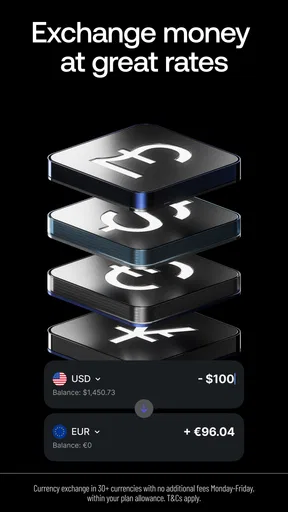
One of the standout features of Revolut is its spending capabilities. I love the fact that you can hold multiple currencies in your account. This is perfect for travelers or anyone dealing with international transactions. The app offers real-time exchange rates, so you’re always getting the best deal, and you can spend abroad without those pesky hidden fees. It’s like having your own mini bank right in your pocket.
Another cool thing? The budgeting tool. It’s like having a personal finance coach guiding you. You can set monthly spending limits for different categories like groceries, dining out, or entertainment, and the app sends you alerts to keep you on track. It’s a lifesaver for those of us who tend to go a little overboard with the weekend brunches.
Saving Smarter
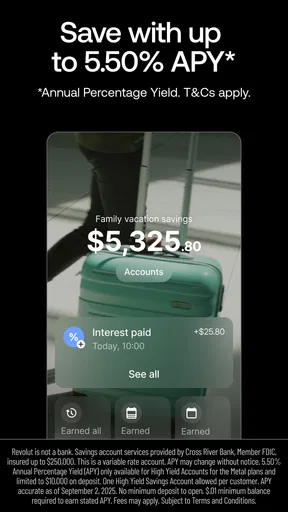
Saving money doesn’t have to be a chore, and Revolut makes it feel like a game. The app’s "Vaults" feature is a fantastic way to save gradually. You can set up a vault for specific goals, whether it’s a vacation fund or an emergency stash, and even enable spare change roundups. It’s amazing how quickly those spare cents add up without you even noticing.
And here’s a little tip: Revolut sometimes offers savings boosts with higher interest rates, so keep an eye out for those opportunities.
Trading on the Go
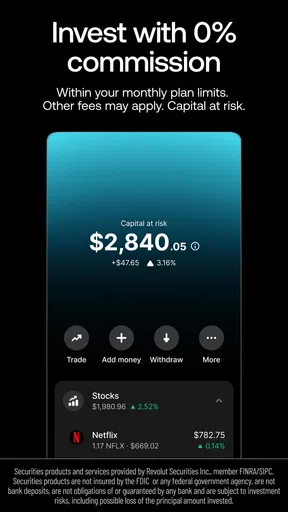
Now, onto the trading aspect. If you’ve ever been curious about dabbling in stocks or cryptocurrency, Revolut makes it super accessible. The app allows you to start trading with minimal amounts, which is great for beginners like me who are just testing the waters.
The interface is clear and informative, providing insights and data to help you make informed decisions. And if crypto is your thing, Revolut supports several popular currencies. It’s like having a mini trading platform in your pocket, always ready when you are.
Security and Support
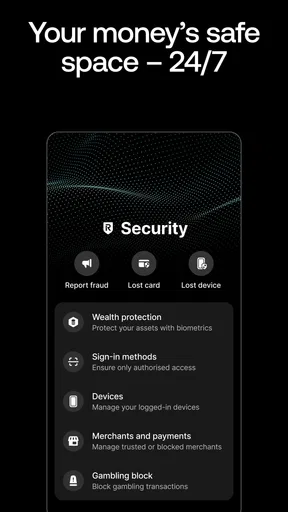
No review would be complete without touching on security, right? Revolut takes this seriously, with features like instant transaction notifications, the ability to freeze your card directly from the app, and two-factor authentication. It’s reassuring to know your finances are safeguarded.
And if you ever run into any hiccups, Revolut’s support team is just a chat away. I had a minor issue with a transaction, and they were quick to resolve it, proving their dedication to customer satisfaction.
Final Thoughts
Wrapping it up, Revolut: Spend, Save, Trade is a powerhouse of an app that brings together the best of spending, saving, and trading. Whether you’re a seasoned trader or someone just looking to manage their daily expenses better, it has something for everyone. The ease of use, combined with robust features and security, makes it a must-try.
So, if you’re ready to take control of your financial world, why not give Revolut a spin? You might find it’s exactly what you’ve been looking for.
Pros
- User-friendly interface with intuitive navigation.
- Supports multiple currencies and instant exchanges.
- Fee-free foreign transactions for premium users.
- Comprehensive budgeting tools and analytics.
- 24/7 customer support via in-app chat.
Cons
- Limited ATM withdrawals on basic plans.
- Some features require premium subscriptions.
- Occasional app glitches during peak hours.
- Geographical restrictions on certain services.
- Crypto trading fees apply after free limit.
FAQs for Revolut: Spend, Save, Trade
What features does Revolut offer for managing finances?
Revolut provides a comprehensive suite of financial tools, including budgeting, expense tracking, savings vaults, and currency exchange. Users can easily manage their daily spending through detailed analytics and set savings goals. Additionally, Revolut offers trading options for stocks and cryptocurrencies, making it a versatile tool for personal finance management.
Is Revolut safe to use for online transactions?
Yes, Revolut is safe for online transactions. It employs advanced security measures, such as two-factor authentication and biometric login, to protect user accounts. Additionally, Revolut is regulated by financial authorities in various countries, ensuring a secure environment for managing your finances and making transactions.
How does Revolut handle currency exchange and international payments?
Revolut allows users to exchange currencies at the interbank rate with no hidden fees up to a certain limit, making it ideal for international travelers. It supports multiple currencies and enables users to send and receive money globally with ease. This feature helps avoid expensive conversion fees typically associated with traditional banks.
What are the fees associated with using Revolut?
Revolut offers different plans, each with varying fees. The standard plan is free but has limitations on free ATM withdrawals and currency exchange limits. Premium and Metal plans come with monthly fees but offer additional benefits, such as higher withdrawal limits, travel insurance, and priority customer support. Users should review these plans to choose the best fit.
Can Revolut be used for business purposes?
Yes, Revolut offers business accounts designed to streamline financial operations for companies. These accounts provide tools for managing expenses, payroll, and international payments. Businesses can benefit from real-time notifications, multi-currency accounts, and integrations with popular accounting software to enhance financial efficiency.


